Clinical AI · AI digital patient intake
Care begins with the intake
 Prototype screen with demo data
SpineIntake is an AI digital patient intake form for hospitals. Patients fill in their intake on a tablet, a kiosk or their own phone while they wait, and clinicians review the organized intake form right before the visit. Because intake is about gathering information, the AI does not diagnose, and no clinical assessment is shown on the patient's screen.
Status
In August 2026 we deployed it to the production environment and completed one end-to-end test, from filling in the intake to the printable form. We are now preparing for adoption at the first hospital, and we plan to apply it to real patients after the clinical department's review and the legal review are complete. It has not yet been used by real patients.
Background
New patients fill in a paper intake form in the waiting room, and the physician asks the same things again in the consultation room. SpineIntake started from this problem.
- 01
Paper forms that are hard to read
New patients fill in a paper intake form in the waiting room. Handwriting is hard to read, items are left blank, and front desk staff end up asking the same things again.
- 02
The first 3 minutes spent asking again
The physician spends about the first 3 minutes of the visit asking again where it hurts, since when and how.
- 03
Difficulties for older and foreign patients
Older patients get stuck on small print and medical terms, and foreign patients who are not fluent in Korean find it hard to fill in the form.
- 04
A different EMR at every hospital
Each hospital uses a different EMR (electronic medical record system), so integrating the intake automatically would require separate development for each hospital. For that reason SpineIntake does not connect directly to the EMR and instead finishes with an intake form file.
Overview
It is built on the principle that intake is about gathering information, not about diagnosis or guidance. Patients answer easily, clinicians review organized content, and the final judgment is always made by clinicians.
Questions are data, not code
Intake sets that fit each department and hospital are created and published from the admin screen. Changing a question does not require redeploying the program.
Screens designed around older patients
Large text, one question per screen and read-aloud questions come as standard. Text size, contrast and button size were set with older patients in mind as the main users.
Judgment by rules and clinicians
Signals in the answers that clinicians should check are picked out by rules defined in advance. The AI language model (LLM) makes no judgments and handles wording only, and no diagnosis or assessment is shown on the patient's screen.
A design that does not depend on the EMR
The intake result is finished as PDF and PNG files. The hospital simply registers these files in the EMR like a scanned document, so any hospital can adopt it in the same way, whatever EMR it uses.
Guide illustrations shown with each question. They are used in the actual questionnaire screens and contain no text, so every language uses the same pictures.
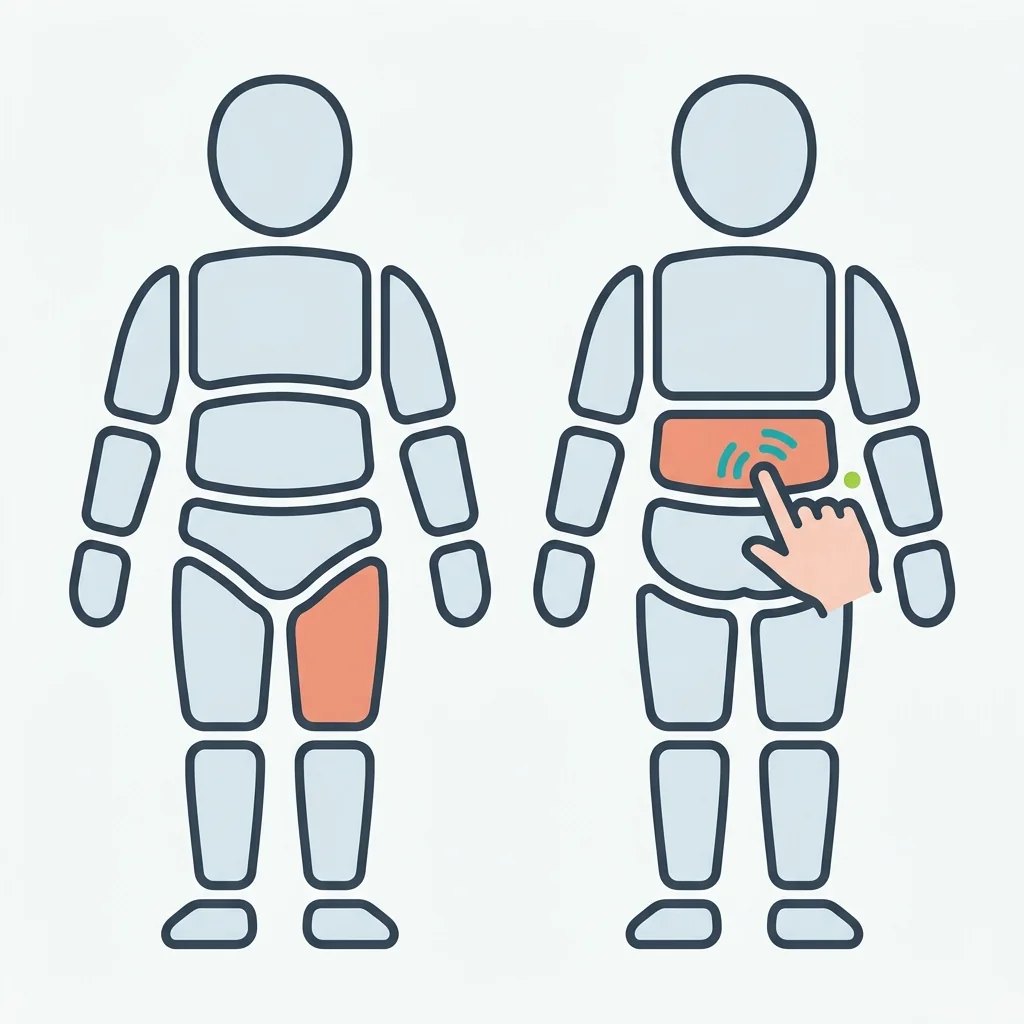
Tap the body diagram to mark where it hurts. 
Choose how strong the pain is. 
A voice mode reads each question aloud and takes spoken answers. 
At the start, the patient consents to the collection and use of health information.
Screens
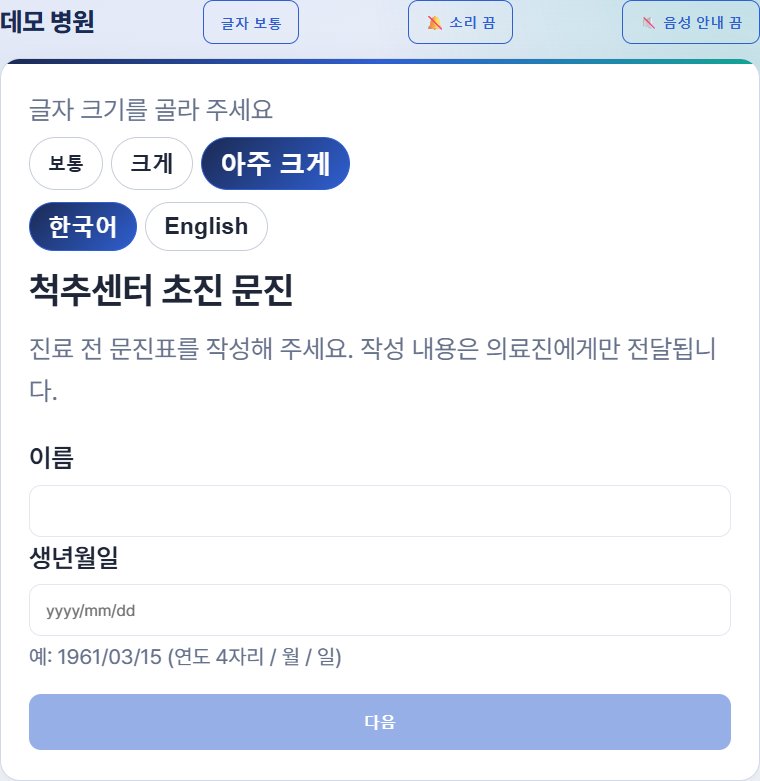
The intake start screen, where the patient first chooses a text size and then enters their name and date of birth. 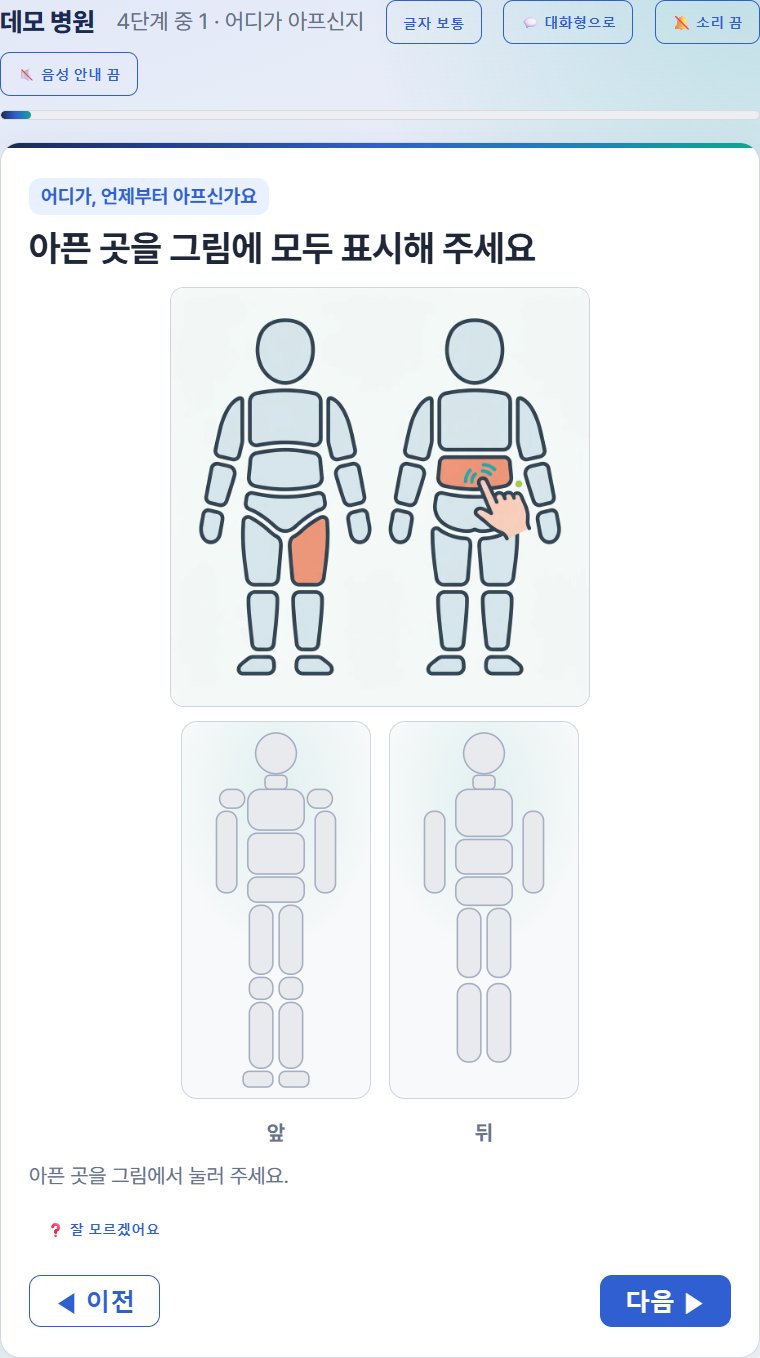
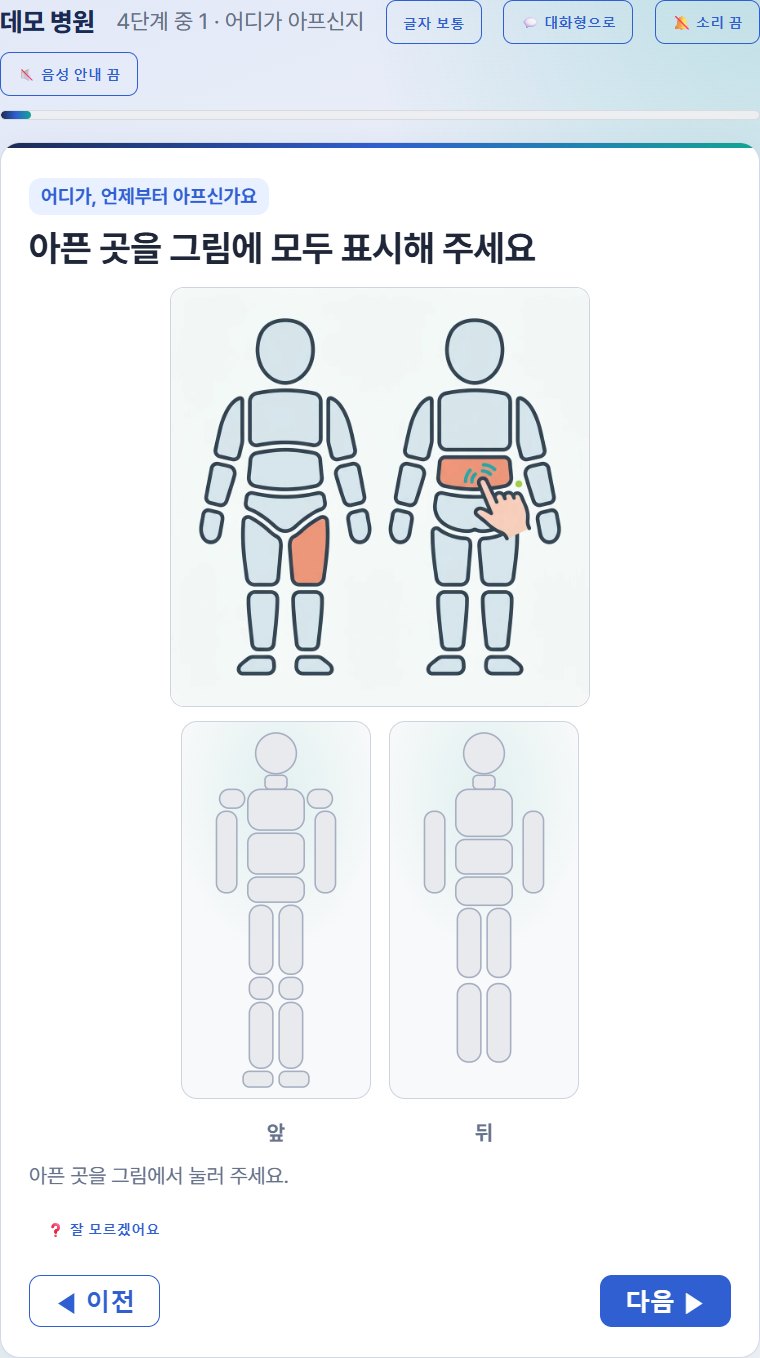
A question where the patient taps where it hurts on front and back body diagrams. 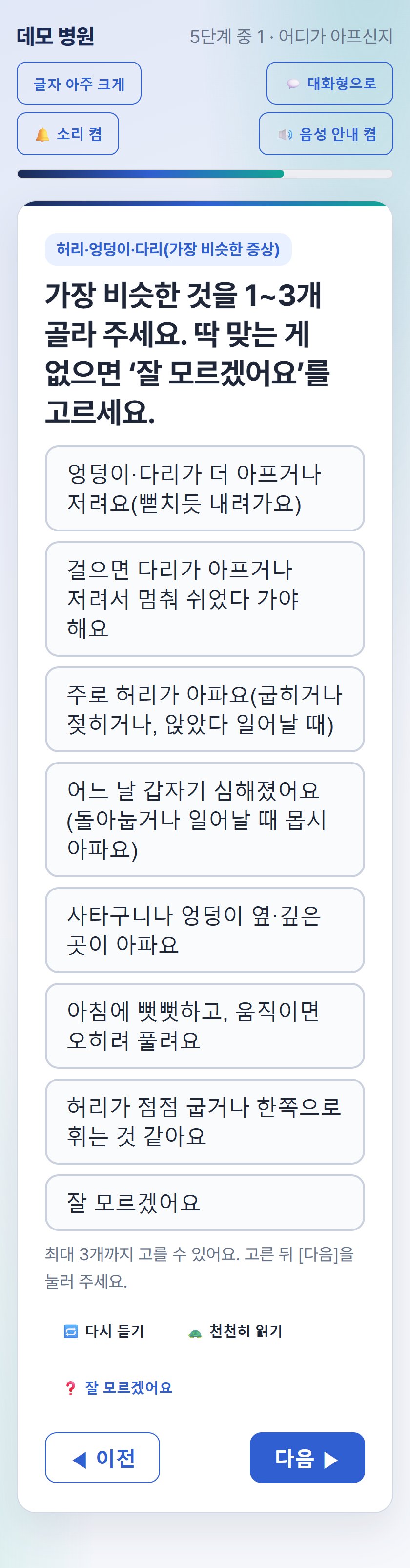
A question where back and leg symptoms are chosen from sentence cards that describe symptoms rather than disease names, shown on a phone with large text and voice guidance turned on. 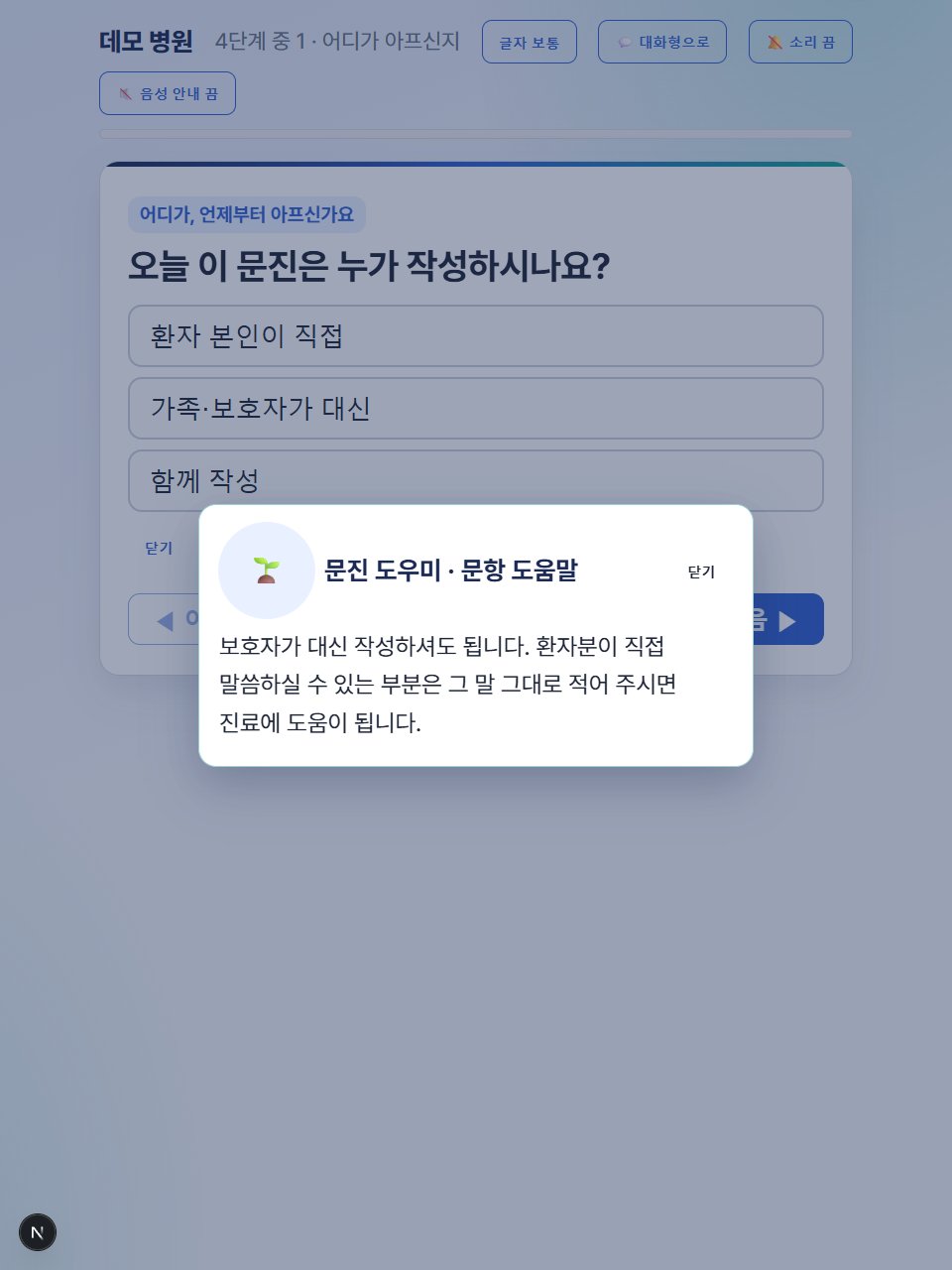
Tapping [I'm not sure] opens a pop-up with a plain-language explanation prepared by the hospital. 
After submission the reference number is shown in large type, and the patient gives this number to the front desk. 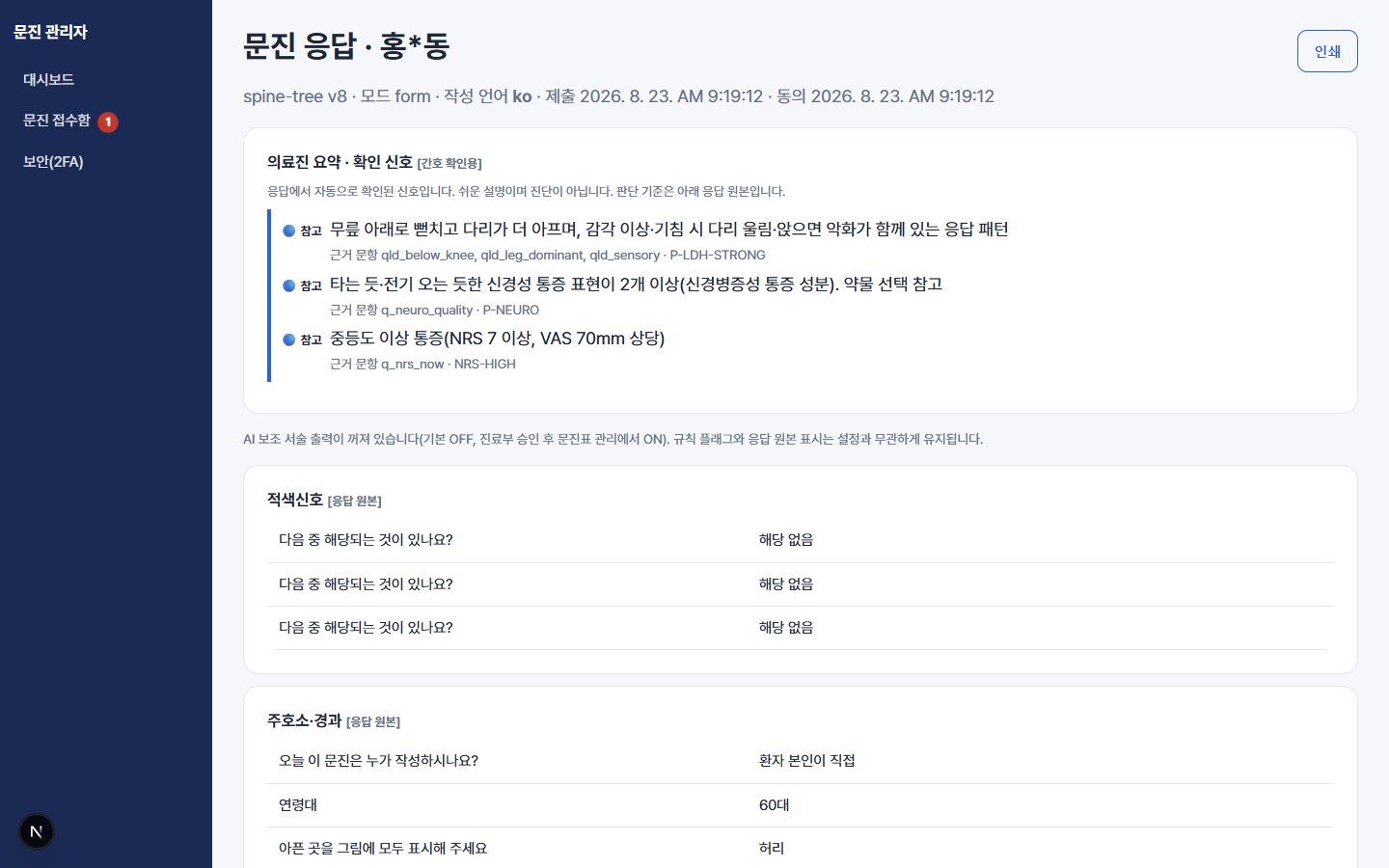
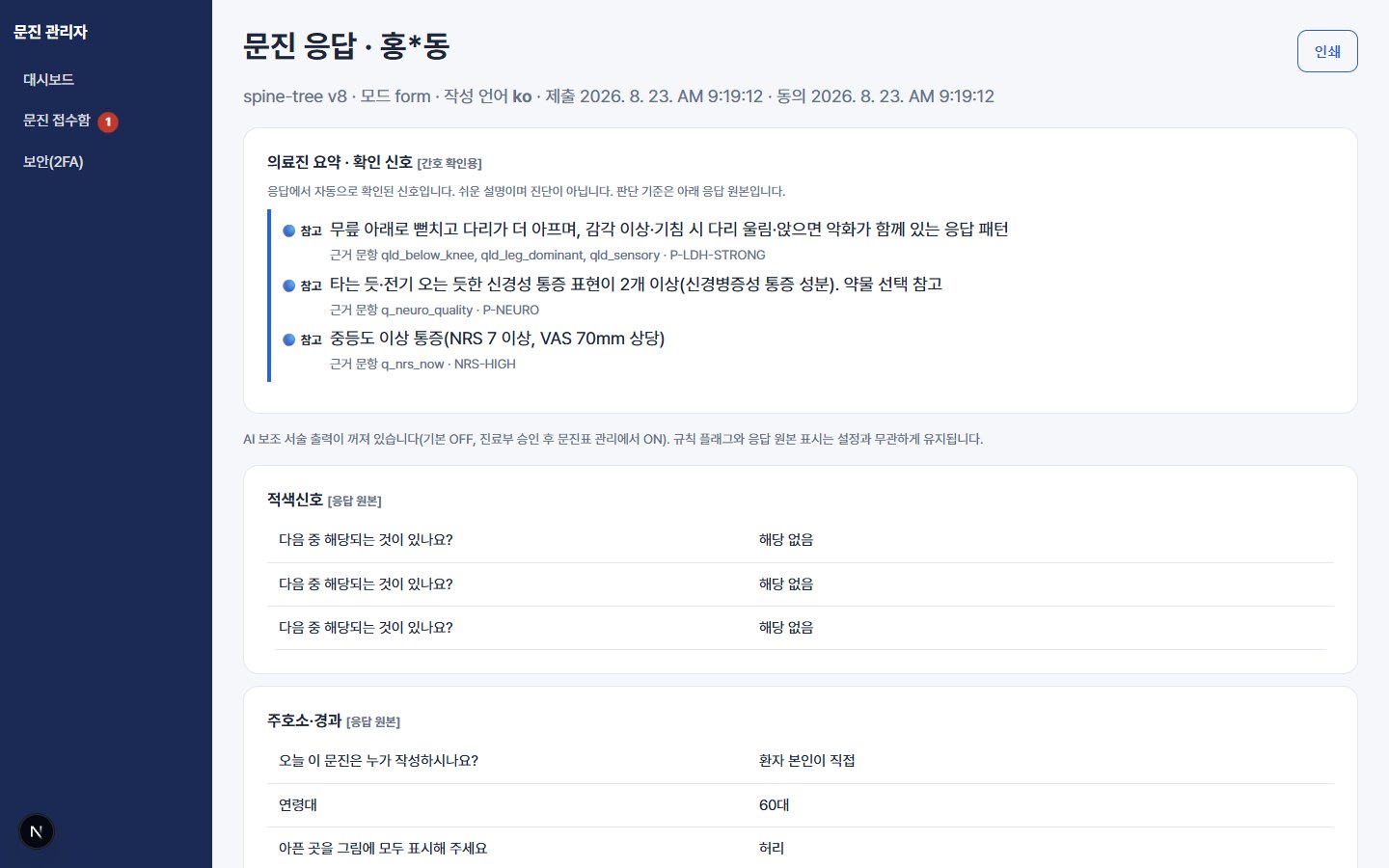
The response screen for clinicians, showing the signals to check picked out by the rules at the top and the patient's original answers below. 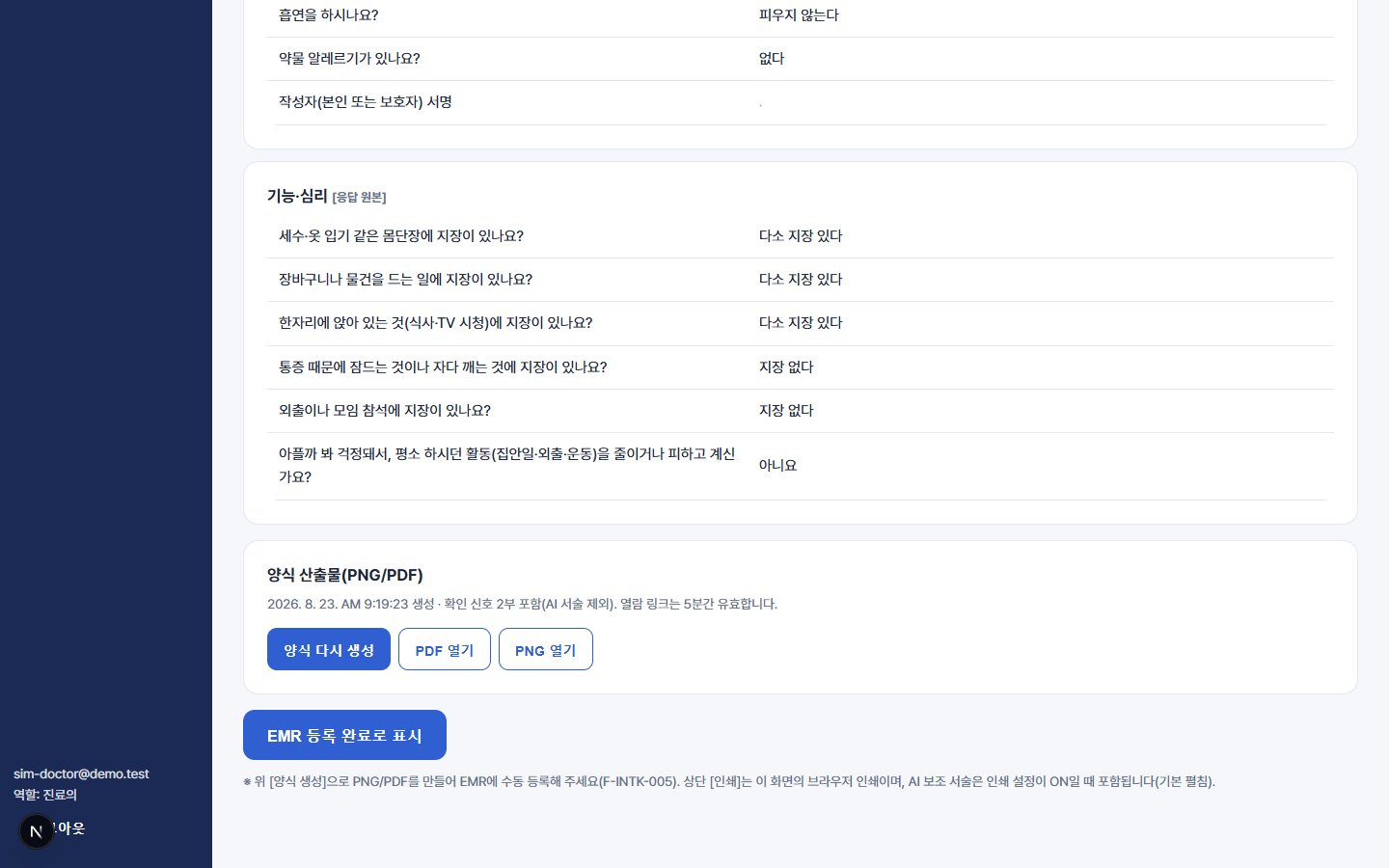
At the bottom of the response screen, the A4 intake form (PDF, PNG) is generated and opened, and it is marked as done once EMR registration is complete. 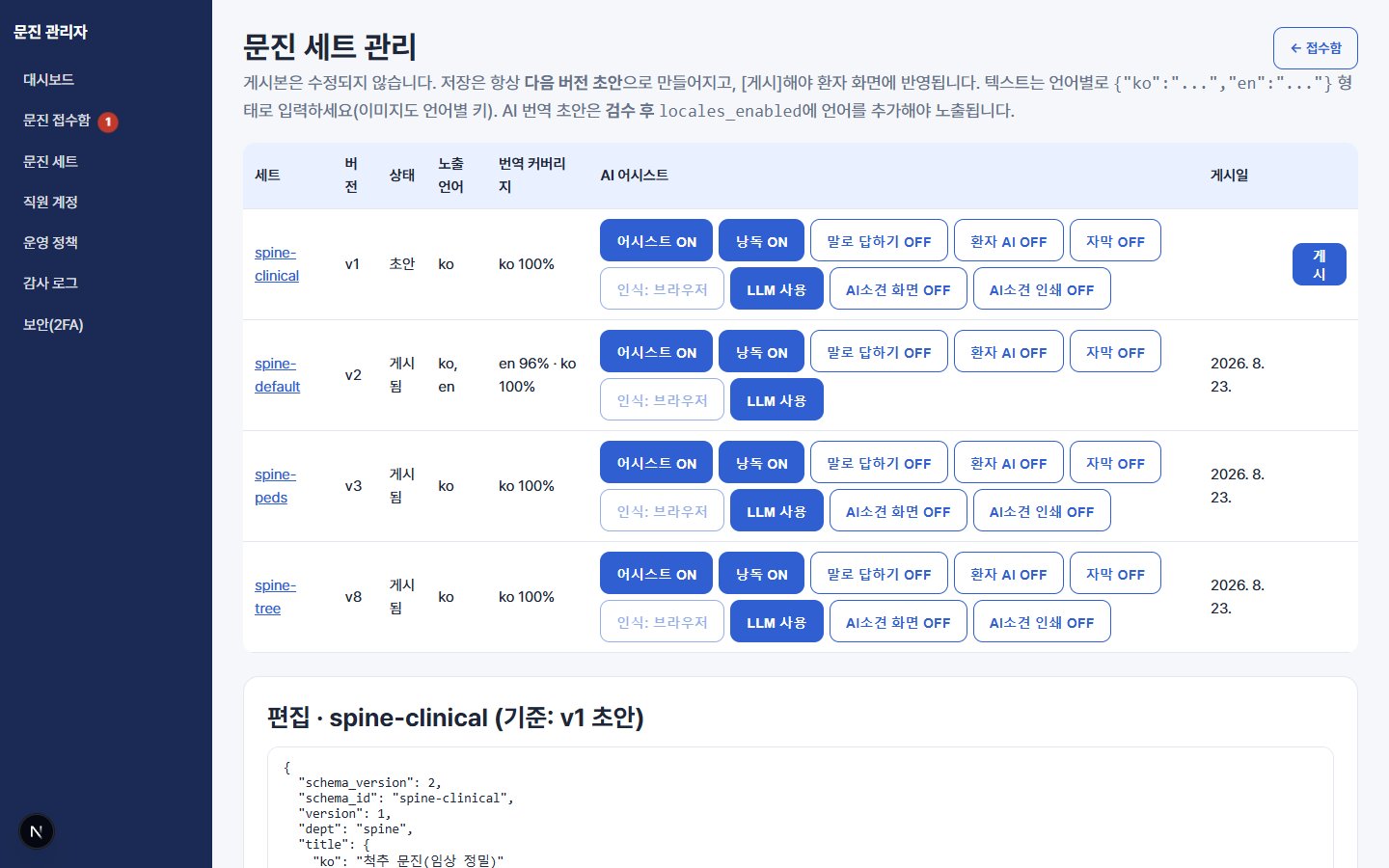
The intake set management screen, where each set's version and publication status are shown and the read-aloud and AI functions are turned on or off.
Features
It is divided into the patient screens, the screens for clinicians and front desk staff, and intake set management. AI assistance is a feature the hospital chooses to turn on, and the whole intake process works without AI.
01Patient screens
One question per screen
The screen shows a single question, answered with large buttons. Only the questions that are needed follow, depending on earlier answers, and progress is shown as stages rather than as the number of questions left.
Three ways to answer
There is the default form mode, a conversational mode that asks and answers in speech bubbles, and a voice mode that reads questions aloud and takes spoken answers. Switching modes keeps what has been entered. Because spoken answers send the patient's voice to an external speech recognition service, that function is off by default and the hospital chooses whether to turn it on.
Large text and read-aloud questions
On the first screen the patient chooses one of three text sizes. Questions are read aloud, with replay and slow reading supported, and in the in-hospital tablet mode large text and large buttons are applied by default.
Body map and pain scale
Patients tap where it hurts on front and back body diagrams and choose a pain level as a number from 0 to 10. They sign on the screen with a finger.
"I'm not sure" help
When the meaning of a question is unclear, tapping [I'm not sure] brings up a plain-language explanation prepared by the hospital. As of August 2026, help text has been written for all 145 questions in the adult set and all 47 questions in the pediatric set.
02Screens for clinicians and front desk staff
Intake inbox
Submitted intakes appear in the list right away. Patient names are shown partly masked, intakes can be found by reference number, date range and status, and whether each one has been registered in the EMR is tracked alongside.
A response screen that puts the original first
The patient's original answers are at the center, with the summary and AI assistance placed as supporting reference. Translations, summaries and narrative text produced by AI do not overwrite the original. They are stored separately and labeled as AI on screen.
Rule-based signals to check
Rules defined in advance pick out, from combinations of answers, signals that clinicians should check, and show them in plain sentences together with the questions they are based on. This is a prompt to check, not a diagnosis, and whether to display it is decided by the hospital in its operating policy (off by default in the product).
A4 intake form and EMR registration
On submission, a signed A4 intake form is generated as PDF and PNG. The hospital downloads or prints the file, registers it in the EMR like a scanned document, and marks the registration status in the inbox.
03Intake sets and optional features
Intake set management
Questions, answer options, branching conditions and help text are managed as a set and published with a version. A published version does not change, so past responses can be viewed again with the questions exactly as they were at the time. For now sets are edited as JSON (a configuration data format), and an on-screen editor is planned as the next step.
Spine intake sets
We first organized a hierarchy leading from symptoms to conditions and built the questions on top of it. Patients choose sentence cards that describe symptoms, not disease names, and only the detailed questions that match their choices follow. As of August 2026 there is an adult set (145 questions) and a set for children and adolescents (47 questions), assigned automatically by age, and questions are published after review by the clinical department.
AI assistance (optional)
AI helps with explaining terms, tidying free-text answers, translation and reference narratives for clinicians. The hospital turns it on and off for each set, and AI functions on the patient screen are off by default. Content tidied by AI is saved only after the patient checks it and taps [Apply], and narratives for clinicians are not shown to the patient.
How it works
There are five steps, from the patient filling in the intake to the hospital registering it in the EMR.
- 01
Start and consent
The patient chooses a text size, enters their name and date of birth, and consents to the collection and use of health information. Patients who do not consent are directed to a paper intake form.
- 02
Filling in the intake
The patient answers one question at a time. In the August 2026 verification scenarios, one patient answered 23 to 44 questions.
- 03
Review, sign and submit
The patient reviews and corrects their answers on one screen, then signs and submits. The reference number is shown in large type, and the entries left on the device are erased immediately.
- 04
Review in the inbox
Front desk staff and clinicians find the intake by its reference number and review the original answers and the summary.
- 05
Print the form and register it in the EMR
They print the A4 intake form or download it as a file, register it in the EMR and mark it as registered in the inbox.
Who it is for
Older new patients
They answer one question at a time in large text and can listen to the questions read aloud. Words they do not understand are explained in plain language on the spot.
Patients who fill it in ahead of time
They can fill it in at home on their phone before the visit. If they stop partway, what they entered is not saved. For now staff share the link, and automatic sending is in preparation.
Front desk staff
They see submitted intakes in the inbox right away and find them by the reference number the patient gives. They print the intake form or download it as a file and register it in the chart and the EMR.
Nurses and physicians
In the short time right before the visit they see the summary and the signals to check, and they can compare these against the patient's original answers at any time.
Hospital administrators
When they want to change a question, they edit and publish it themselves without asking the vendor. Operating policies such as staff accounts and retention periods are also set from the admin screen.
Technology
The patient screens and the hospital admin screens run as a single web service. Filling in and submitting the intake are designed to work at all times, even without AI.
Web-based setup
It is used by opening a web address in the browser of a tablet or phone, and the patient screens and hospital admin screens form a single web application (Next.js, Supabase). The current test environment is hosted in a Seoul-region cloud, and before it is applied to real patients we plan to decide where data is stored after legal review.
An intake engine separate from AI
Question display conditions, answer validation and the calculation of signals to check are handled by the intake engine according to fixed rules, and the AI language model is not involved in this process. If the AI service fails, filling in and submitting the intake continue to work as usual. When AI functions are turned on, identifying information such as names and contact details is masked before anything is sent to the external AI service.
Data separated by hospital
All hospitals use the same program, but data is separated hospital by hospital. Automated tests check that one hospital cannot access another hospital's responses or settings.
Privacy protection
Names and dates of birth are encrypted and stored separately, and only partly masked names are shown on screen. Printable intake forms are kept in private storage and opened through links that are valid for only 5 minutes, with a record of who opened them and when. Original voice recordings are not stored.
Shared devices and retention
On in-hospital tablets, entries are erased and the screen returns to the start after submission or after a set period without input. Intakes filled in ahead of time by patients who then do not visit become subject to deletion after 7 days by default, and the retention period is set by the hospital in its operating policy.
Testing and verification
As of August 22, 2026, it had passed 287 automated tests, 55 tests of isolation between hospitals and of permissions, and server and screen tests for 60 condition-specific scenarios. This verification looked at whether the program works as designed. The clinical validity of the questions and usability for actual older patients are to be confirmed through the clinical department's review and field testing.
Adoption
The goal is to open a new hospital with settings and intake set configuration alone, without changing the program.
Adoption steps
The steps are, in order: registering the hospital, applying the hospital's colors and logo, entering hospital information, issuing admin accounts, configuring the intake sets and having them reviewed by the clinical department, connecting the web address, and confirming a test submission. The product standard is that this process involves no changes to the program, and we plan to verify this in an adoption rehearsal for a second hospital.
Devices needed
For use in the hospital we recommend a tablet of 10 inches or larger, a current Chrome or Edge browser, a stand with an adjustable angle and the hospital Wi-Fi. Patients can also fill it in on their own phones.
No EMR integration development
Because the intake form is downloaded as a file and registered, no integration development with the hospital EMR is needed. Automatic transfer to the EMR and two-way integration are not in the product scope.
AI is optional
It can be adopted without AI, using only the rules and the prepared help text. AI assistance and spoken answers are optional features that the hospital turns on for each set when needed.
Roadmap
August 18, 2026
The intake function, which had been part of a hospital website package, was separated and started out as a standalone product.
August 22, 2026
We deployed it to the production environment and tested the whole process once, from filling in the intake to review in the inbox and generation of the printable form.
In progress
We are preparing for adoption at the first hospital. We plan to apply it to real patients after the clinical department's review of the questions, the legal review of the consent text and privacy policy, and the decision on where data is stored are complete.
Before go-live (planned)
We plan a field test with 5 to 8 older users. The target is for 70% or more to finish the intake without help.
In design
To reduce the number of patients who give up partway because the intake is long, we are designing a two-stage approach that takes a short, simple intake first and the detailed intake afterward.
Next steps (planned)
We are planning, in order, a set editor for editing questions on screen, sending of links for filling in ahead of time, wider translation starting with English, an adoption rehearsal for a second hospital, and intake sets for departments other than spine.
FAQ
Does the AI diagnose?
No. Diagnosis, severity assessment and treatment recommendations are not provided to patients in any form. Signals for clinicians to check are picked out by fixed rules, the AI handles only supporting tasks such as explaining terms and tidying text, and the final judgment is made by clinicians.
Can it be used without AI?
Yes. It can be adopted in a configuration with AI turned off. In the August 2026 verification, with AI off, intake submission, rule signals, original answers and the printable form all worked normally, and not a single AI call was made.
Does it integrate with the hospital EMR?
Not directly. The intake form is generated as PDF and PNG files, and the hospital registers them in the EMR like a scanned document. This was a design decision, made because EMRs differ from hospital to hospital and integration development becomes an obstacle to adoption.
What about patients who find a tablet difficult?
Large text and read-aloud questions are provided as standard, and a paper intake form can be chosen on the consent screen. As a principle, paper intake forms are always kept available alongside.
Can it be filled in in a foreign language?
The structure is in place for patients to fill it in in their own language while the hospital receives a Korean intake form. However, the spine intake sets are currently available in Korean only, and we plan to translate them in turn, starting with English, and to offer them after human review.
How does it relate to SpinePilot?
They are separate products. They are designed to follow on from each other, with SpineIntake before the visit and SpinePilot in the consultation room, and using intake data as input to SpinePilot is at the planning stage.
Notice
The AI does not diagnose. No assessment is shown on the patient's screen, and the organized summary is there to support review by clinicians.